Wednesday, July 26

MCTian Meetup


Malaysia MCT meetup

Once, MCT meet up again. We met up in Mid Valley, KL.

Result: We are going to do a Vista Preview briefing to MCT KL.

See you there in KLCC, Microsoft in August!

Some photos taken

Monday, July 24

Account Problems


Exchange 5.5 to Exchange 2003 migration is being a hot cake in this part of the world. Lots of the migration used OWA 2003 as the replacement of other email clients. However, password expires, account lockout problems give Administrators lots of issues - increase helpdesk calls+++

In this session, we would like to share on how identify/findout when particular account password expired+++

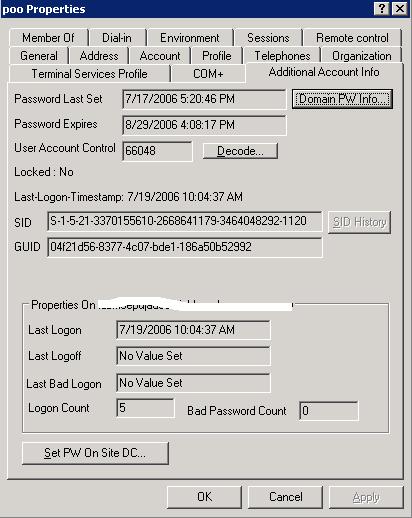
To reach the objective, Acctinfo.dll need to register to DC.

Acctinfo.dll adds a new property page to the user object Properties dialog box in Active Directory Users and Computers. This will then show the date when a user's password was last set, the date when a user's password will expire, and the dates and times when a user last logged on and logged off. Most of the info needed/important unfortunately is not store in AD - BUT- We can calculate based on the user password set. Normally, we need to run lots of script, which give overhaed to Administrators. Acctinfo.dll performs these calculations for you!

System Requirements
Windows Server 2003 or Windows 2000 Server operating system - You must be an Administrator to install Acctinfo.dll.

How to install
  • First of all, install donwload Windows 2003 resource kit from Microsoft Website. Install the downloaded Resource Kit.
  • Then install Windows Support Tools (From Windows 2003 CD)
  • Copy the file Acctinfo.dll (Depending where you install) to the %windir%\system32 folder. In Windows Server 2003, this is typically C:\Windows\System32. In Windows 2000, this is typically C:\Winnt\System32.
  • Open a command window, and type the following (this example assumes that your %windir%\system32 folder is C:\Windows\System32):
  • regsvr32 c:\windows\system32\acctinfo.dll

Security Event Logs - Logon Event IDs

Lots of people asking us, after setting security events, how to monitor it? Most of them only showing event IDs. Believe that Microsoft has the lists on it showing in Technet website, however, for most of our customers/readers convenient, let us share some important events:

  • 528- This is the successful logon
  • 529-537 - Failed logon. Where (529 - Bad username and password, 530 - time restrictions, 531 - account disabled, 532 - Expired accounts, 533 - cannot logon to specific computer account, 534 - Disallowed logon type, 535 - Expired password, 536 - Server is not available, 537 - Other reasons)
  • 548 - Might be your your trust broken (SID does not match)
  • 550 - Your network might be under DOS attack
  • 551 - Logoff events
  • 552 - UserB force logon to another computer while UserA is logged on
  • 682 - User has reconnect to a disconnected terminal session
  • 683 - User disconnect from terminal session without logoff

With this small piece of information, hope this will help most of the people managing/maintaining your AD!

Monday, July 17

Windows Vista

Hi all,

Good day. After knowing Windows Vista, just wondering how many of them will buy new hardware for Vista? or you will use back the existing one?

To know more about Vista Hardware requirements? Please go to http://www.microsoft.com/technet/windowsvista/evaluate/hardware/vistarpc.mspx

You can reply via this post - just a quick survey.

Saturday, July 15

Exchange 2007 - a quick glance

Our Technology Adoption Program customers, existing and potential customers always ask us, what Microsoft is to give in new Exchange Server 2007?

Lets have a quick tour on partial E2007 features.

Discuss about E2007 installation, you need .NET Framework 2.0, MMC3.0. For choosing server role, you will need to select either 1) Bridgehead Server Role, 2) Mailbox Server Role, 3) Client Access Server Role - We will post more article on discussion what is all these abouts. Please come back to this blogs more often...:)

Still remember ForestPrep and DomainPrep in Exchange 2000 and Exchange 2007, no longer have this in Exchange Server 2007. It will be done automatically.

Installation of Exchane 2007 now is just like Vista - for those who tried. The installation program will then:

Copy Exchange Files - take about 3 minutes
Preparing Organization - take about 25 minutes
Installing Bridgehead Server Role -about 2 minutes
Installing Mailbox Server Role - about 4 minutes
Installing Client Access Server - about 2 minutes

In the Beta 1 version of Exchange Server 2007,ya, Beta 1 - the reason is, we are using this version to test out. The Exchange Management Console is referred to as both the Exchange Management Console and Exchange System Manager. Its a bit different in Exchange 2003, which only has Exchange System Manager.

Administering Exchange become easier with Exchange Management Shell and Administrative Scripts. Most of the administrative task can be done with just few lines of script.

Enforcing Compliance by Creating an EthicalFirewall - yes, you can have rules configured in this version of Exchange. Example, you can filter subjects that can be send via the Exchange Server, eg: Subject that has "Company Secret" be blocked. In addition, you can create Email Life-Cycle Policies.

DR will always be the headache for most of administrators, with the latest feature - Using Exchange Server 2007 LocalContinuous Replication, you can bring up your Exchange 2007 database in minutes! Yes, it is. We will prepare some print screen and lab in the future.

As mentioned, this is the first glanced, we will publish more articles in this blog regarding this.